

Expand your system's abilities
Radio doesn't stop at just a terrestrial broadcasting - iMediaTouch's optional modules expand your systems abilities with innovative and time saving software solutions. Our optional modules offer you some great solutions for automatic content importers, remote voice tracking capabilities, internet revenue solutions and live assist tools to make your radio stations even better.
iMediaTouch optional modules enhance your experience and create an even more simplified workflow for your staff. If you have any questions about our optional modules please contact our Sales Team.
Remote VoiceTracking | Automatic Content Import | Wide Area Content Management | Live Assist Software

Optional Modules expand your iMediaTouch System's capabilities

RemoteVT Portal Internet Voice Tracking
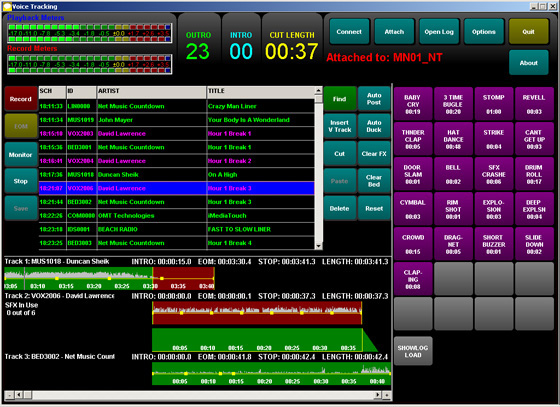
RemoteVT Portal multitrack voicetracking software
- Music audition listen out and listen in for a dynamic "in studio" feel
- Drag & drop adjustment of audition play-out time prior to record post
- Drag & drop adjustment of music fade & music intro levels
- Auto Post and Auto Duck also provided for quick packaging of a voice track
- Talent can add up to six tracks of sound effects, music beds and audio bits to the dry voice track
- Complete drag & drop sound bit positioning and level adjust on each track with reference to the dry voice track
- Music Bed pop in feature allows drag & drop placement under the dry voice track, with full level and fade adjustment

iMediaImport Automatic Content Importer
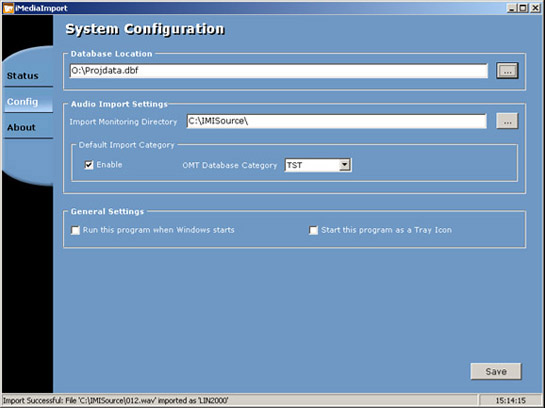
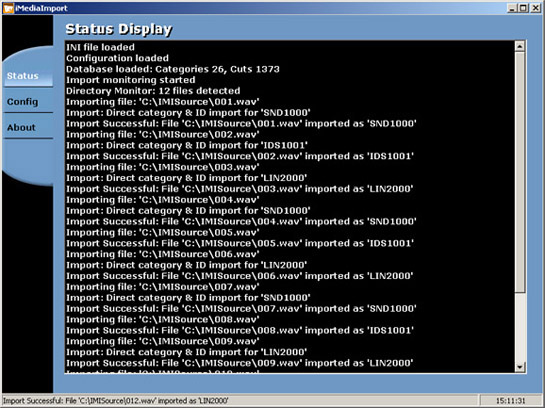
Control and transfer assets automatically from a variety of sources!
The iMediaImport Module automatically imports station content from a variety of sources - just configure iMediaImport and you will never have to manually download or transfer content again. iMediaImport will distribute content to designated database folders utilizing the popular "Cart Chunk" and id3 Tagging systems. Users of iMediaImport can have any content automatically placed and titled into their iMediaTouch system.
iMediaImport can import content from a variety of sources. For example:
- NPR Content Depot
- FTP Sites
- Network Folders
- Productions Houses
- Music and Programming Services (example: Jones Network)
- Third Party Multi-Track Software (example: Adobe Audition)
- Newroom Applications (example: Burli, KLZ)
- Digital Media Distribution System (DMDS)
- Many others
Import features:
- Monitor and import unlimited audio files
- Supports the following formats:
- MPEG 1 Layer 1
- MPEG 1 Layer 2
- MPEG 1 Layer 3
- Windows Media Audio
- PCM Uncompressed
- Easy to use interface for quick configuration
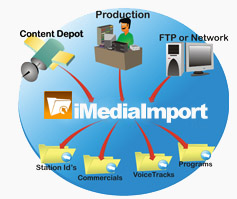
The illustration above shows an example of how iMediaImport receives and distributes content from a variety of sources.
What can it do for me?
iMediaImport will save you time! Just set the module to monitor the location of the content you need to import. iMediaImport will distribute for easy retrieval into your iMediaTouch System. iMediaImport helps stations share content on a whole new level!

iMediaAccess Wide Area Content Management
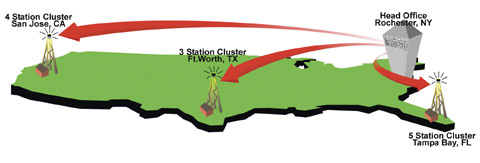
Example of the 'Central to many' configuration where multiple station clusters access one central facility to share content and schedules
Control and transfer assets throughout any station cluster!
iMediaAccess provides a wide area connectivity strategy for radio groups. Providing a highly interactive remote interface to single stations and station clusters, iMediaAccess features content, scheduling and operational management functions.
The system architecture and flexibility of configuration are the key advantages of the iMediaAccess system over most competitive offerings. While other systems provide remote access features, none come close to the configuration flexibility and user interactivity of iMediaAccess.
The system can be designed and configured for a variety of connectivity needs:
- "One to many" where a user can access many individual stations or station clusters
- "Many to one" where many users can access a single station or station cluster
- "Many to many" where many users can access many stations or station clusters
- "Central to many" where many users can access a single central facility which provides automated access to many other stations or station clusters
What can it do for me?
iMediaAccess delivers enhanced operational efficiency by allowing staff to manage stations over wide geographic areas. Staff can be concentrated at head office or strategically distributed in geographic regions to control programming content, commercial traffic, daily schedules and operational management.

iMediaPix Live Assist Software
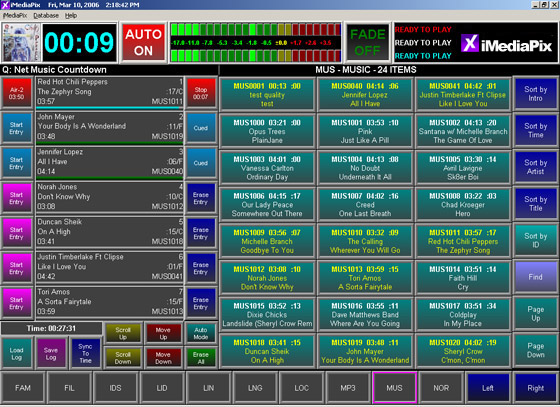
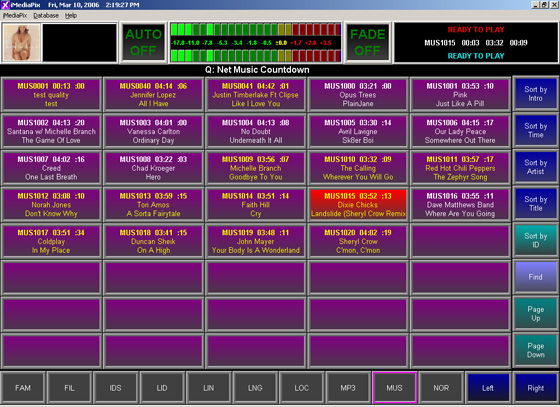
A great Module for any Live Assists Station needing a Cart Wall
A simple, yet powerful iMediaTouch module, iMediaPix is ideal for your live assist operations needing commercial, ID and promo solutions. Browse an infinite number of categories, create logs for your broadcast day or load up a great playlist for your morning show – iMediaPix is the all-in-one simplified solution for radio.
Perfect for news applications, morning shows or other personality intensive radio shows, iMediaPix puts digital audio at your fingertips and lets you put it on the air instantly.
One iMediaPix does the work of a hundred "button boxes" at a fraction of the cost. Talent can play pages and pages of overlapping cuts hot, or load the cuts in the 7 event cut player. iMediaPix also features a page filled with 40 instant-start hot keys.
The system can be designed and configured for a variety of connectivity needs: Playlist, Hot Button Sound Wall
- Cartwall Mode for 40 Hot start buttons
- Windows XP Pro and Windows 7
- Hot start playback of MPEG Layers 1, 2 and 3 as well as WMA and PCM files
- Up to 6 stereo overlaps on playback
Easy to use with Mouse, Keyboard and/or Touch screen - Live Assist or AutoPLAY modes
- Easy access to your music and sound effects libraries
- View cuts by artist, category, time or ID number